



Erika Palmer
Co-Founder of CuplaErika started Cupla with her husband Will after realising how easily date night slips when two busy lives collide. Today she leads the company's mission to give couples back their quality time, and she still swears by a long nature walk and a table at a restaurant neither of them has tried before.

A shared family calendar app puts everyone’s appointments, school runs and activities in one place, so nobody double-books the car or forgets a dentist visit. The hard part is choosing one: some apps are built around couples, some around kids and chores, and some are simply the calendar that’s already on your phone.
When household planning sits on one person’s shoulders, it wears on the relationship too. We’ve written about how unequal household labour affects relationships, and a good shared calendar is one of the simplest ways to spread that load.
Managing after-school activities, doctor’s appointments, and family gatherings needs the right shared calendar solution. We tested and compared the best calendar sharing app for families that will help you pick the perfect one for your household’s needs.
Cupla: The Ultimate Couples-First Family Calendar
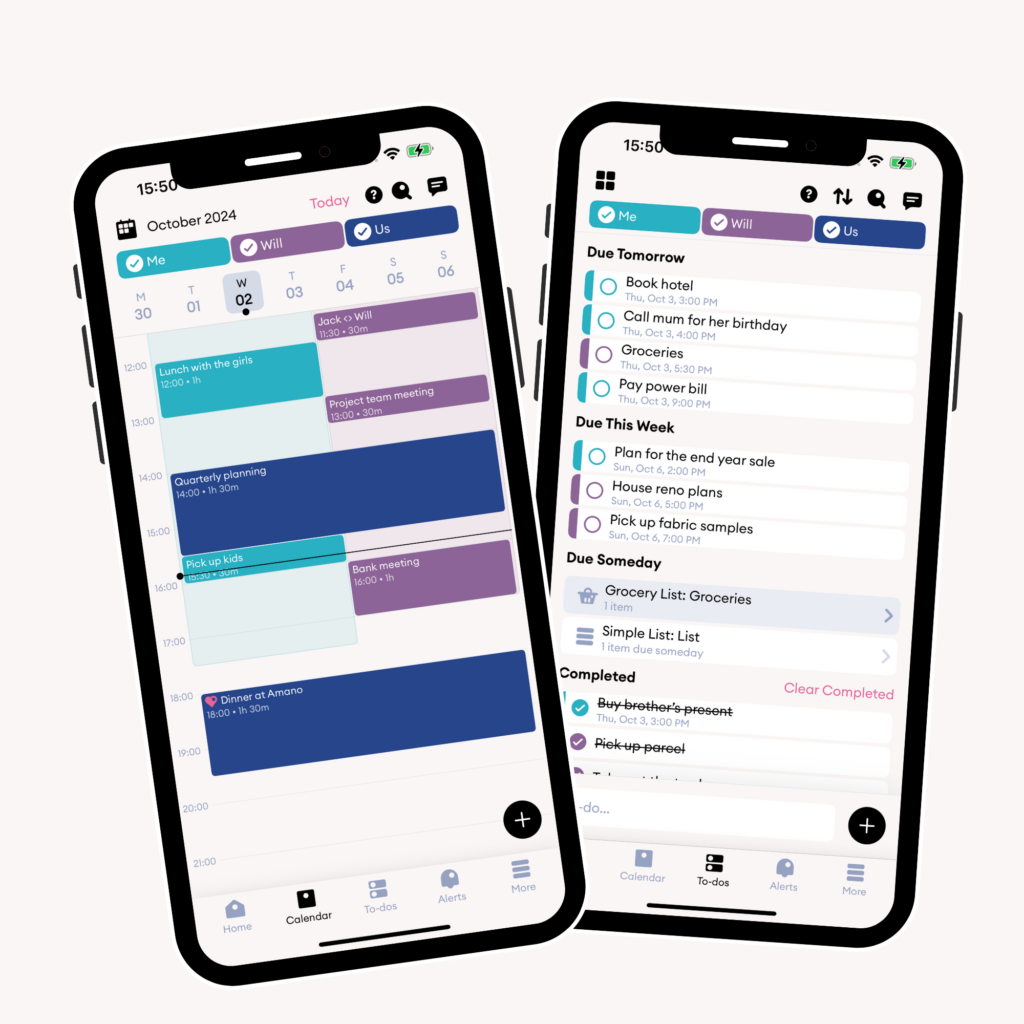
Cupla is a shared calendar app for couples that also works as a family calendar for parents running a household together. It has passed 1 million downloads in 155 countries, is used by more than 500,000 couples, and is rated 4.7 on the App Store.
In Cupla’s 2025 Impact Report, based on feedback from more than 2,100 users, 76.3% said Cupla improved their communication and 63.5% said it helped them spend more quality time together.
Key Features for Couples and Families
Cupla’s core feature is one combined view of both partners’ schedules. It syncs two ways with Google, Apple (iCloud) and Outlook calendars, so shared events also show up in each partner’s own calendar. The app lets couples:
- See complete schedules side-by-side
- Set goals for date night frequency
- Add events to their partner’s calendar
- Get reminders for important dates
- Share calendar details or just a “busy” status, calendar by calendar
- Create shared Wishlists for gifts, travel, plans and more
- Ask Cupla Assist, the built-in AI assistant, to find a time you’re both free or turn a quick note into an event
Event Categories and Organization
Cupla’s tags let you organize events your way. Give each tag a color and label to track kids’ activities, pets or recurring plans, then filter the calendar by tag to find what you need. Tags are also an easy way to keep the kids’ schedules visible to both parents.
To-do Management System
Couples who live together can use Cupla’s shared to-do lists for everything from household chores to grocery shopping and holiday planning. Each to-do can be assigned to you, your partner or both, with reminders, priorities and repeats so nothing slips.
Pricing and Premium Features
Cupla is free, and every feature is available on the free plan. The free plan shows your partner’s calendar, the month view and to-dos for a limited window around today. Cupla Premium starts at USD 4.99 a month (prices vary by region and platform), one subscription covers both partners, and it adds:
- An unlimited time range for your partner’s calendar, the month view and to-dos
- Your partner’s undated to-dos
- Higher usage limits for Cupla Assist
See the full free vs Premium comparison in our help center. Less time spent coordinating schedules leaves more room for quality time together.
Google Calendar: The Free Family Favorite
Google Calendar is the default choice for many families because it’s free, works on Android, iPhone and the web, and is probably already on your phone. If you use Cupla too, you can connect Google Calendar to Cupla in a few taps.
Core Family Features
When you create a family group on Google, it automatically creates a shared calendar called “Family” for up to six members. Everyone in the group can add events and get notified about them. Key features include:
- Event creation and management
- Customizable notifications for each family member
- Color-coding for different schedules
- Automatic events from Gmail
- Sharing permissions for each calendar
If you need more than a calendar, see our roundup of calendar and time-management apps for busy families.
Integration Capabilities
Google Calendar adds events from Gmail automatically, such as flight and hotel bookings, restaurant reservations and ticket confirmations. In the EU, UK, Switzerland and Japan this is switched off by default, so you’ll need to turn it on in settings. Google Tasks with a due date also appear in your calendar, but Tasks lists can’t be shared with your family group, so you’ll need Google Keep or another app for a shared to-do list.
Ease of Use for All Ages
Parents can create and supervise Google Accounts for children under 13 (the age varies by country) through Family Link, so kids can see the family calendar without a fully independent account. Day, week and month views make it easy to track everyone’s commitments.
You also decide who sees what. Each calendar can be shared at five permission levels, from “See only free/busy” up to “Make changes and manage sharing”.
Cozi Family Organizer: All-in-One Family Management
Cozi is one of the longest-running family organizer apps. It combines a shared, color-coded calendar with shopping lists, to-do lists and a recipe box, and works on iPhone, Android and the web.
Calendar and List Management
Each family member gets their own color, so you can view one person’s schedule or everyone’s at once. The free plan includes the shared calendar and automatic notifications. Cozi Gold adds up to three reminders per event and alerts when someone changes the calendar.
Shopping and to-do lists update live, so anyone can add items from their own phone while someone else is at the store. For more apps in this category, see our guide to family organizing apps.
Meal Planning Features
The recipe box makes meal planning easier for families. Users can:
- Keep favorite recipes in one place
- Import recipes by pasting a website link
- Send ingredients to a shopping list with one tap
- Put meals on the family calendar
Free vs Premium Comparison
Cozi’s free plan covers the shared calendar, shopping and to-do lists, and the recipe box. Cozi Gold costs USD 39 a year for the whole family and adds:
- No ads
- Calendar search
- Month view on mobile
- Birthday tracker
- Shopping Mode
- Up to three reminders per event, plus change notifications
- Priority email support
A newer tier, Cozi Max (USD 79 a year), adds AI tools: AI event import, an AI recipe creator and an AI meal planner.
Apple Calendar: Perfect for Apple Ecosystem Families
Apple Calendar comes built into every iPhone, iPad and Mac, which makes it the easiest option for households that are all-in on Apple. The trade-off is that there’s no Android app, so it’s a poor fit if anyone in the family uses an Android phone.
iCloud Integration Benefits
Calendars are stored in iCloud and sync automatically across iPhone, iPad and Mac, and your Apple Watch shows what’s on your iPhone. On a Windows PC you can use iCloud for Windows with Outlook, or iCloud.com in a browser.
Family Sharing Features
Family Sharing supports up to six people, and setting it up automatically creates a shared calendar called “Family” on everyone’s devices. Beyond that, you can:
- Share any iCloud calendar with specific people as read-only or editable
- Publish a public, view-only calendar that anyone can subscribe to with a link
- Get notified when shared events are added or changed
- Include kids under 13 with a child account managed by a parent
Cross-device Synchronization
Changes you make on your iPhone show up on your iPad and Mac within moments. Calendar also works with Maps: add a location to an event and you’ll get a time-to-leave alert based on current traffic.
FamilyWall: Family Hub with Calendar and Location Sharing
FamilyWall is an all-in-one family organizer from a Paris-based company. Alongside a shared calendar, it offers lists, messaging, a photo gallery and, on Premium, location sharing.
Privacy and Data
FamilyWall says it handles family data in line with the EU’s GDPR. The free version shows ads, and according to its privacy policy the app uses analytics and advertising identifiers. Premium removes the ads.
Location Sharing Capabilities
With Premium, family members can see each other’s locations and get notifications when someone arrives at or leaves a saved place such as home, work or school.
Communication Tools
Built-in messaging lets the family chat and share photos, and Premium adds audio and video messages. The family photo gallery has 100 MB of shared storage on the free plan and 25 GB on Premium.
FamilyWall Premium costs USD 44.99 a year, or USD 4.99 a month on the web (USD 7.99 a month through the App Store). It adds location sharing, budget tracking, meal planning, document storage, Google and Outlook calendar sync, and more storage.
TimeTree: Visual Family Planning Made Easy
TimeTree is a free shared calendar app with more than 67 million users worldwide, according to the company. Its clean, visual layout is easy for every family member to read at a glance.
Multiple Calendar Views
Switch between daily, weekly and monthly views. You can also show your phone’s own calendar (iCloud on iPhone, or Google Calendar if it’s synced to your device) next to your TimeTree calendars, although those external events are view-only and hidden from other members. Premium adds a vertical, hour-by-hour view of up to three days.
Event Planning Tools
Premium subscribers can attach PDFs, Word documents and photos directly to events, which is handy for school letters or appointment paperwork.
TimeTree Premium costs USD 4.49 a month or USD 44.99 a year (prices vary by region) and includes:
- Ad-free experience
- File attachments
- Vertical view of up to three days
- Event priority and pinned events
- Dedicated support
Collaboration Features
You invite family members with a link that stays valid for 90 days, and you can create separate calendars for different groups, from family schedules to hobby clubs. Members can comment on events and share photos, and a feed shows what changed so nobody misses an update.
Microsoft Outlook Family Calendar
If your household already uses Microsoft accounts, Outlook.com has a family calendar built in. When you add people to a Microsoft family group, Outlook.com automatically creates a shared family calendar. It works with a free Microsoft account, so you don’t need a Microsoft 365 subscription.
Microsoft 365 Integration
Families who pay for Microsoft 365 Family (USD 129.99 a year for up to six people) get the same calendar alongside Word, Excel and OneDrive. Microsoft’s AI features in that plan are available to the subscription owner only.
Family Hub Features
The family group also gets its own mailbox and a family email address that works like a mailing list for everyone in the group. On top of scheduling, you get:
- Event notifications on your phone
- Recurring events for regular family activities
- Calendar sharing with view or edit permissions
- Group email to the whole family
Email and Calendar Sync
The family calendar appears in Outlook.com and the Outlook mobile app, but not in the Outlook desktop apps. You can also share your personal Outlook.com calendar with view or edit rights, though invitees need an Outlook.com or Microsoft 365 account to accept.
Any.do Family Organizer
Any.do’s Family plan combines a calendar with task tracking. Rather than replacing your calendar, it pulls in your existing Google, iCloud or Outlook calendar so events and tasks sit in one view.
Task Management Integration
Calendar views show appointments and pending tasks side by side in several layouts:
- Monthly view to plan ahead
- Three-day view for short-term scheduling
- Weekly view to balance activities
- Daily view to focus on tasks
Smart Reminders
On paid plans, location-based reminders (iOS and Android) nudge you when you arrive somewhere, such as the supermarket, and recurring reminders keep routines on track.
Cross-platform Availability
Any.do runs on iPhone, Android, the web, Mac and Windows, and changes sync across devices. The Family plan covers up to four members and costs USD 8.33 a month billed annually (USD 9.99 month to month). It includes:
- Up to four shared boards
- Smart grocery lists sorted automatically by aisle
- Shared task management
- A WhatsApp integration for adding tasks quickly
- Premium features such as location reminders
Each person keeps a private space for their own tasks, while shared boards handle family planning.
OurHome: Family Calendar with Rewards
OurHome turns chores into a game. It combines a family calendar and grocery list with a points-and-rewards system for kids, and it’s free with no ads. One caveat: the app hasn’t been updated in several years, so check that it still works on your device before relying on it.
Gamification Features
Kids earn points for completed chores and put them toward rewards and goals the family agrees on, which makes everyday tasks feel less like a battle.
Chore Management
Parents can schedule chores, set how often they repeat and assign them to different family members, so everyone sees their own list. If you prefer something low-tech, a couples’ chore chart works well alongside a shared calendar.
Reward System
Points add up toward goals you choose, such as extra screen time or a family outing. Some parents also set weekly point targets so kids learn that not every chore earns a reward.
Familio: Extended Family Coordination
Familio (familio.life) is a private, web-based hub for extended families rather than a calendar app in the strict sense. It works best alongside a shared calendar when you want to keep grandparents, aunts and cousins in the loop.
Multi-generation Features
A shared contact list keeps addresses and details up to date, and members get reminders to update their own. A family recipe collection helps pass favorite dishes down the generations.
Photo Sharing Integration
Familio focuses on keeping family photos private. Users get:
- Photos kept at full resolution and stored indefinitely
- Private albums with custom sharing
- Unlimited photos on the paid plan
Family Newsletters
The newsletter feature makes it easy to keep everyone updated. Families can:
- Share key updates with chosen members
- Add curated photo albums to announcements
- Plan large family gatherings
- Control privacy with selective sharing
Familio has a single Standard plan at USD 5 a month, with a 30-day free trial.
Shared Family Calendar Apps Compared
| App | Best for | Price | Platforms | Standout features |
|---|---|---|---|---|
| Cupla | Couples running a household together | Free; Premium from $4.99/month | iOS, Android, web (beta) | • Two-way sync with Google, Apple and Outlook • Shared to-dos and Wishlists • Date night goals • AI assistant |
| Google Calendar | Free, cross-platform families | Free | Android, iOS, web | • Automatic Family calendar (up to 6 people) • Events from Gmail • Family Link for kids |
| Cozi | Lists and meal planning | Free; Gold $39/year; Max $79/year | iOS, Android, web | • Color-coded calendar • Shared shopping lists • Recipe box and meal planner |
| Apple Calendar | All-Apple households | Free | iPhone, iPad, Mac; iCloud.com | • Family Sharing for up to 6 people • Time-to-leave alerts |
| FamilyWall | An all-in-one family hub | Free; Premium $44.99/year | iOS, Android | • Family messaging and photo gallery • Location sharing (Premium) |
| TimeTree | Visual calendars for several groups | Free; Premium $4.49/month or $44.99/year | iOS, Android, web | • Event comments and activity feed • File attachments (Premium) |
| Microsoft Outlook | Households using Microsoft accounts | Free with a Microsoft account | Web, iOS, Android | • Automatic family calendar • Family email address |
| Any.do | Tasks and calendar in one place | Family $8.33/month billed annually | iOS, Android, web, Mac, Windows | • Shared boards • Aisle-sorted grocery lists • WhatsApp integration |
| OurHome | Chores and rewards for kids | Free | iOS (not updated in several years) | • Points-based chore rewards • Shared grocery list |
| Familio | Keeping extended family updated | $5/month | Web | • Shared contact list • Full-resolution photo albums • Family newsletters |
Which Shared Family Calendar App Should You Choose?
The right shared family calendar app depends on who does the planning. If two partners run the household together, Cupla is built for exactly that: one view of both schedules, shared to-dos, and an assistant that finds time when you’re both free.
If you want something free, Google Calendar works on every platform, and Apple Calendar is the easy choice for all-Apple households. Cozi is strong for lists and meal planning, TimeTree for visual calendars across several groups, FamilyWall for an all-in-one family hub, and Any.do if tasks matter as much as events.
Think about your family’s size, which devices everyone uses, and your budget. Cross-platform apps give you more flexibility as kids get their own phones.
Try Cupla for free on iOS and Android and see how a couples-first approach makes family scheduling easier.


